
Neck Pain and Screen Work: Ergonomic Biomechanics, Tech Neck Strains, and Workplace Physiotherapy in India
In short
Extended laptop and smartphone usage generates massive mechanical strain across the cervical spine. Learn the science of tech neck, workstation ergonomics, and physiotherapy corrective routines.
In this guide (5 sections)
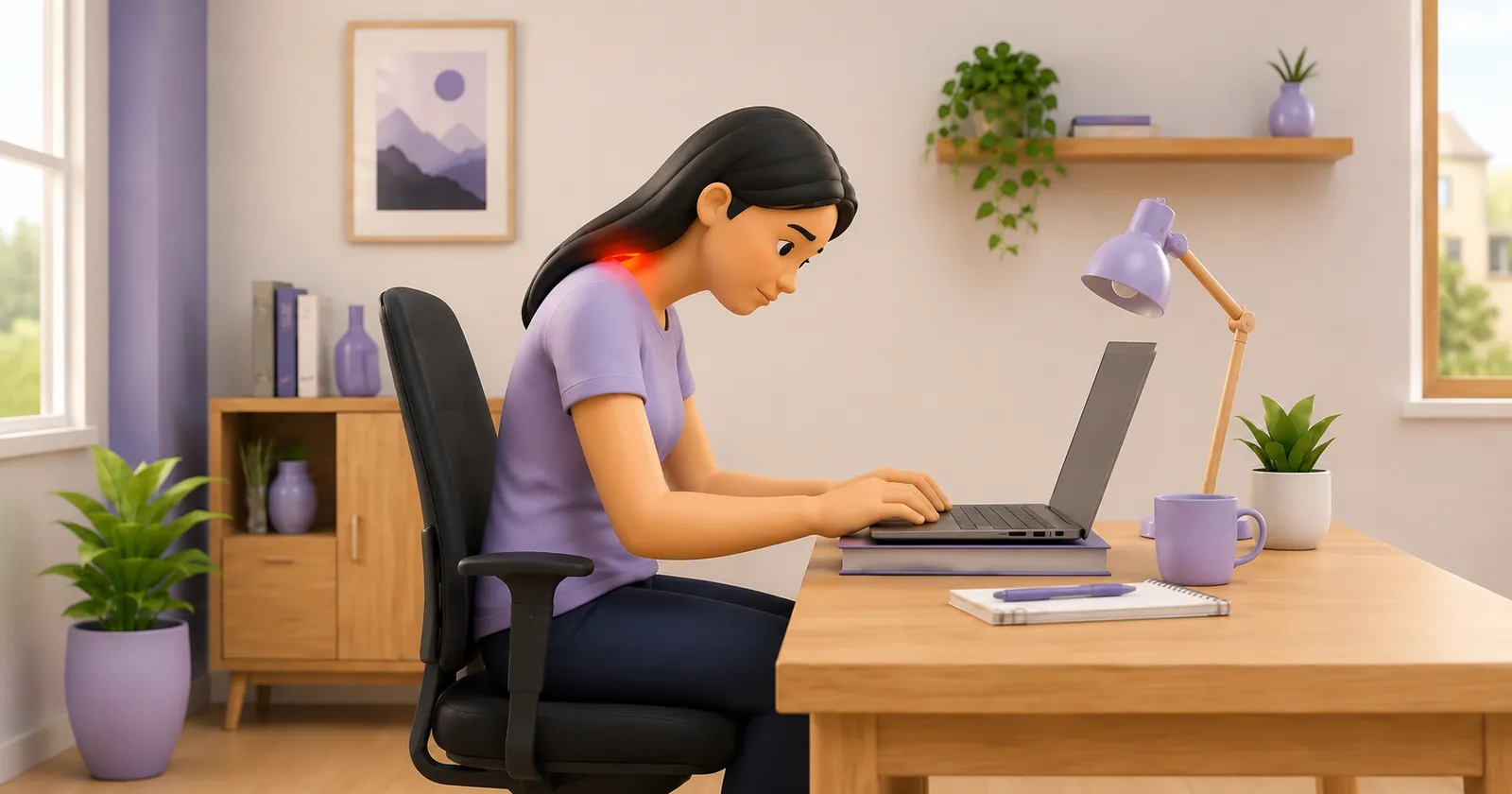
Postural neck pain: colloquially termed 'tech neck' or 'text neck': has escalated into a modern public health epidemic across India's booming IT, financial, and academic sectors. With corporate professionals and remote software engineers routinely clocking 10 to 14 hours of daily screen time across multiple monitors, laptops, and smartphones, static cervical overloading has overtaken traumatic sports injuries as the most common reason young Indian adults consult a physiotherapist.
The mechanical dilemma stems from human evolutionary biology. The human cervical spine was designed for dynamic, multi-directional movement, hunting, and foraging: not for sustaining a static, forward-flexed posture before an illuminated screen for hours on end. When the head angles forward into screen gaze, the physics of lever arms multiply the cervical burden exponentially. Left unchecked, chronic postural strain precipitates early cervical spondylosis, suboccipital tension headaches, and myofascial pain syndrome.
1. Biomechanical Load Escalation: Kapandji Cervical Gravitational Vectors
Groundbreaking biomechanical modeling published by Dr. Kenneth Hansraj demonstrates the dramatic surge in cervical loading as the head tilts forward from the anatomical zero-degree baseline. In a neutral upright posture, the adult human head weighs approximately 4.5 to 5.5 kilograms. As the neck flexes forward to peer down at a laptop or handheld mobile device, the gravitational moment arm lengthens.
| Head Flexion Angle | Effective Gravitational Load | Typical Screen Task | Muscular Stress Response |
|---|---|---|---|
| 0 Degrees (Neutral) | 4.5 to 5.5 kg (10 to 12 lbs) | Upright eye-level monitor gazing | Balanced co-contraction of anterior flexors and posterior extensors |
| 15 Degrees | 12.2 kg (27 lbs) | Slight laptop slant on elevated stand | Mild tonic contraction of upper trapezius and splenius capitis |
| 30 Degrees | 18.1 kg (40 lbs) | Laptop flat on standard office desk | Marked sustained isometric fatigue; ischemic trigger point formation |
| 45 to 60 Degrees | 22.2 to 27.2 kg (49 to 60 lbs) | Handheld smartphone texting in lap | Severe shear strain on C5-C7 discs; suboccipital nerve entrapment |
2. Upper Crossed Syndrome: Muscular Imbalance in Indian Workstations
First described by Dr. Vladimir Janda, Upper Crossed Syndrome represents the predictable neuromuscular adaptation to chronic seated screen postures. The syndrome is defined by a cross-pattern of hypertonic, facilitated muscles crisscrossing with inhibited, chronically weakened muscles. Specifically, the anterior chest muscles (pectoralis major and minor) and posterior neck extensors (upper trapezius and levator scapulae) become severely shortened and hyperactive.
Conversely, the deep cervical flexors (longus colli, longus capitis) on the anterior neck and the mid-back scapular retractors (lower trapezius, rhomboids, serratus anterior) become reciprocally inhibited and weak. This muscular imbalance pulls the shoulder girdles forward into protraction and internal rotation, elevates the clavicles, and thrusts the mandible forward. Patients experience persistent knotting along the top of their shoulders, burning between the shoulder blades, and throbbing tension headaches originating at the base of the skull.
3. Three-Phase Workplace Postural Restoration Protocol
Rehabilitating tech neck requires a combination of desk-side neuromuscular resets and targeted postural strengthening.
Phase 1: Cervical Retraction Chin Tucks (The Micro-Break Reset)
Objective: Restore neutral vertical plumb line alignment and stretch the hypertonic suboccipital triangle.
- 1Sit tall in your office chair with your back supported and eyes looking straight ahead at eye level.
- 2Place two fingertips gently on the centre of your chin.
- 3Without tilting your head upward or downward, glide your head directly straight backward as if making a subtle double chin.
- 4Imagine the back of your head sliding up an invisible vertical wall, feeling a pleasant lengthening stretch at the base of your skull.
- 5Hold the retracted position for 3 seconds, relax smoothly to neutral, and repeat. Never thrust backward forcefully.
Phase 2: Doorway Pectoral Stretch and Thoracic Extension
Objective: Lengthen tight anterior chest structures and open the thoracic kyphosis to enable scapular retraction.
- 1Stand in an open doorway. Place your forearms flat against the door frame on either side with elbows bent at 90 degrees at shoulder height.
- 2Step one foot forward through the door while keeping your core lightly engaged to prevent hyperextending your lower back.
- 3Gently lean your chest forward through the doorway until you feel a firm, comfortable stretch across your anterior chest and shoulders.
- 4Breathe slowly and deeply into your ribcage for 30 seconds, allowing the chest tissues to elongate.
- 5Step back under control, relax for 10 seconds, and repeat.
Phase 3: Scapular Wall Angels with Chin Retraction
Objective: Condition the lower trapezius, rhomboids, and deep cervical flexors in functional synergy.
- 1Stand with your back, buttocks, and the back of your head resting flat against a smooth wall, heels positioned 10 centimetres away.
- 2Gently retract your chin so the back of your skull maintains contact with the wall.
- 3Raise your arms out to your sides into a 'goalpost' position with the backs of your elbows and wrists touching the wall at shoulder height.
- 4Slowly slide your arms upward overhead as high as you can without allowing your lower back to arch excessively or your elbows to pull away from the wall.
- 5Pause at your highest controllable reach for 1 second, then slide back down slowly to the starting position.
If screen-related neck pain is accompanied by dizziness or lightheadedness when turning or looking up, physiotherapists screen for vascular compromise. Immediate medical evaluation is required if you experience the '5 Ds and 3 Ns': Dizziness, Diplopia (double vision), Dysarthria (slurred speech), Dysphagia (difficulty swallowing), Drop attacks (sudden falling without loss of consciousness), Nystagmus (involuntary eye twitching), Nausea, or Numbness on one side of the face.
4. Workplace Ergonomic Adjustments and Fee Benchmarks in India
Fixing tech neck requires addressing the physical work environment. Key ergonomic modifications include: elevating laptop screens on an adjustable riser so the top border of the display aligns with horizontal eye level; connecting an external Bluetooth keyboard and mouse to keep forearms supported at 90 degrees; setting chair height so feet rest flat on the floor; and establishing a strict 20-20-20 rule (every 20 minutes, look at an object 20 feet away for 20 seconds to reset ocular-cervical reflexes).
Physiotherapy clinics in Indian metropolitan areas typically charge ₹400 to ₹1,500 for an ergonomic assessment and manual therapy session. Home-visit ergonomic consultations range from ₹600 to ₹2,000, allowing the physiotherapist to inspect and customize the patient's actual domestic work desk, chair, and lighting. Transparent clinical care involves paying directly per visit without compulsory upfront lock-ins.
5. Frequently Asked Questions Regarding Screen-Induced Neck Pain
Can screen neck pain cause headaches at the back of the head?
Yes. This condition is termed cervicogenic headache. When you sustain a forward head posture, the suboccipital muscles at the base of the skull (rectus capitis posterior and obliquus capitis) become severely compressed and hypertonic. The greater and lesser occipital nerves pass directly through or beneath these tight muscle fibers. When compressed, they refer throbbing, dull pain upward over the skull, culminating behind the eyes and forehead in a classic 'ram's horn' distribution.
Are laptop stands and external keyboards really necessary?
Yes, they are practically indispensable for preventing chronic cervical strain. A laptop has a conjoined keyboard and screen: if the screen is at comfortable eye height, the keyboard is too high, causing shoulder impingement; if the keyboard is at comfortable typing height, the screen is too low, forcing the neck into 30 to 45 degrees of continuous flexion. An inexpensive laptop riser paired with an external keyboard and mouse separates display height from hand positioning, immediately cutting cervical loads in half.
Should I crack my own neck when it feels stiff from computer work?
You should avoid habitual self-cracking of the neck. The cracking sound is cavitation (gas bubbles collapsing inside synovial fluid). When you crack your own neck, you typically mobilise the hypermobile segments above or below the stiff, restricted vertebrae, rather than the fixated joint that actually needs release. Over time, repeated self-manipulation stretches surrounding joint ligaments, creating cervical hypermobility and increasing muscular spasm. Guided active stretches and professional mobilisation are vastly safer.
Is heat or ice better for neck stiffness after a long workday?
For chronic postural stiffness and muscle tension resulting from long desk hours, moist heat is generally superior. Heat dilates blood vessels, increases blood flow, flushes out metabolic waste products like lactic acid, and relaxes tight myofascial trigger points in the trapezius. Apply a warm compress or heating pad for 15 to 20 minutes in the evening. Cold ice packs are reserved for acute, sharp inflammatory strains or sudden traumatic injuries.
Can standing desks cure tech neck?
A standing desk is a valuable tool for reducing static spinal loading, but it is not a standalone cure. If you stand with poor biomechanics (such as leaning forward over your desk, locking your knees, or looking down at a low monitor), you merely transfer cervical strain into your lower back and feet. The true clinical goal is dynamic variation: alternate between 45 minutes of supported sitting and 15 to 30 minutes of upright standing throughout the working day.
Related condition guides

BookPhysio.in Editorial Team
The BookPhysio.in editorial team writes and maintains this content, checking it against reliable clinical sources. Content follows our medical review policy: general information only, and no page claims a clinical review until a named registered physiotherapist has signed it off.
Read our medical review policy