
How to use BookPhysio.inGuides for patients
Booking a physiotherapist, changing an appointment, home visits, session records, and getting the app on your phone. Open a question to see the steps.
How to book a physiotherapy appointment on BookPhysio.in
Search for a physiotherapist, pick a slot and send your booking request. Takes about three minutes, no phone call needed.
How to book a physiotherapy appointment on BookPhysio.in
Search for a physiotherapist, pick a slot and send your booking request. Takes about three minutes, no phone call needed.
You search for a physiotherapist, choose a time from their live availability, and send a booking request. If the physiotherapist accepts, you get the clinic address and contact details by email. If they cannot take it, you are told by email too. You pay them directly at the session.
Step 1: Search for a physiotherapist
Tap Find care in the bottom bar and choose your city first. Then search by condition or by a physiotherapist’s name, and filter for a clinic visit or a home visit.
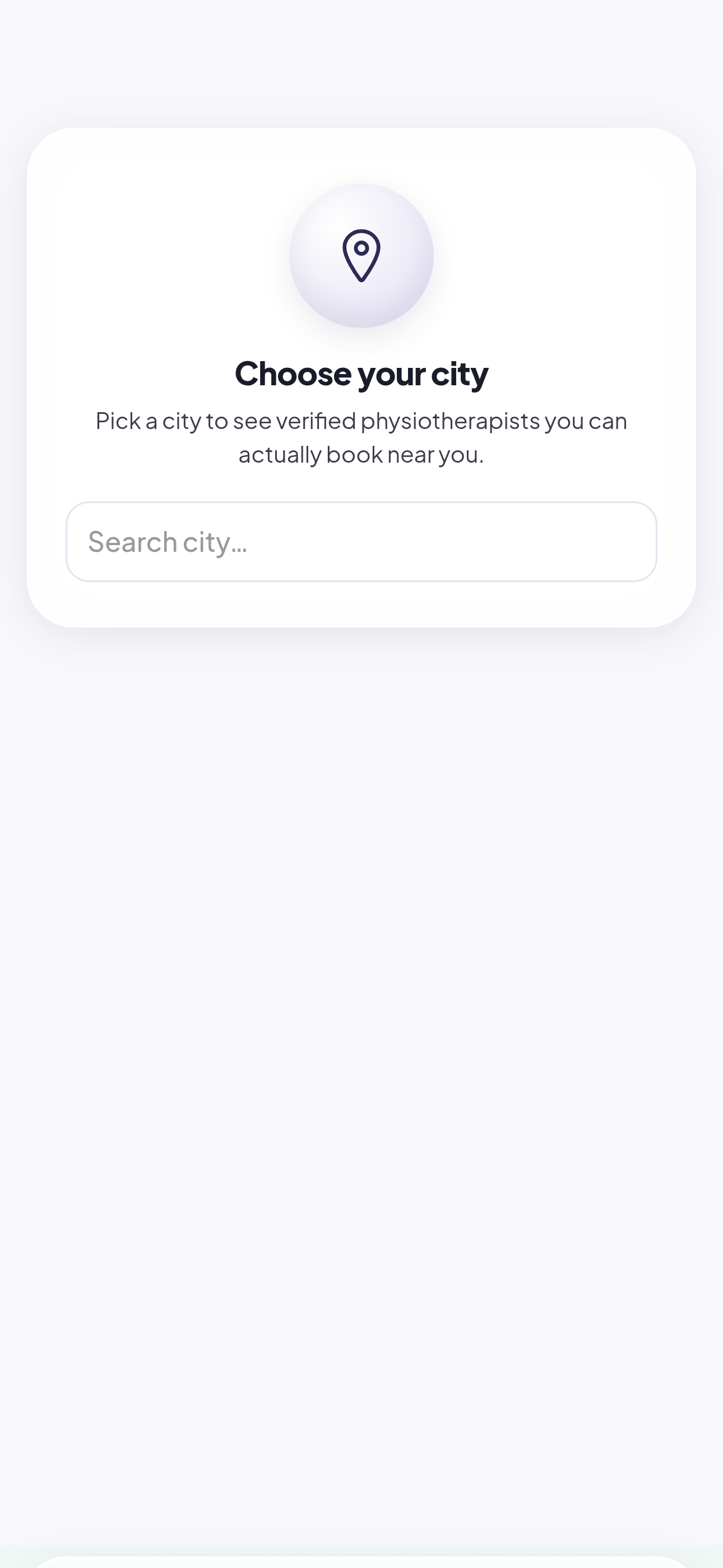
Example screen. The physiotherapists, ratings, prices and counts shown are made up for this guide. Step 2: Compare the physiotherapists you find
Each profile shows the specialties, what we checked on their credentials, their consultation fee and whether they visit homes. Open a profile to read the full details.
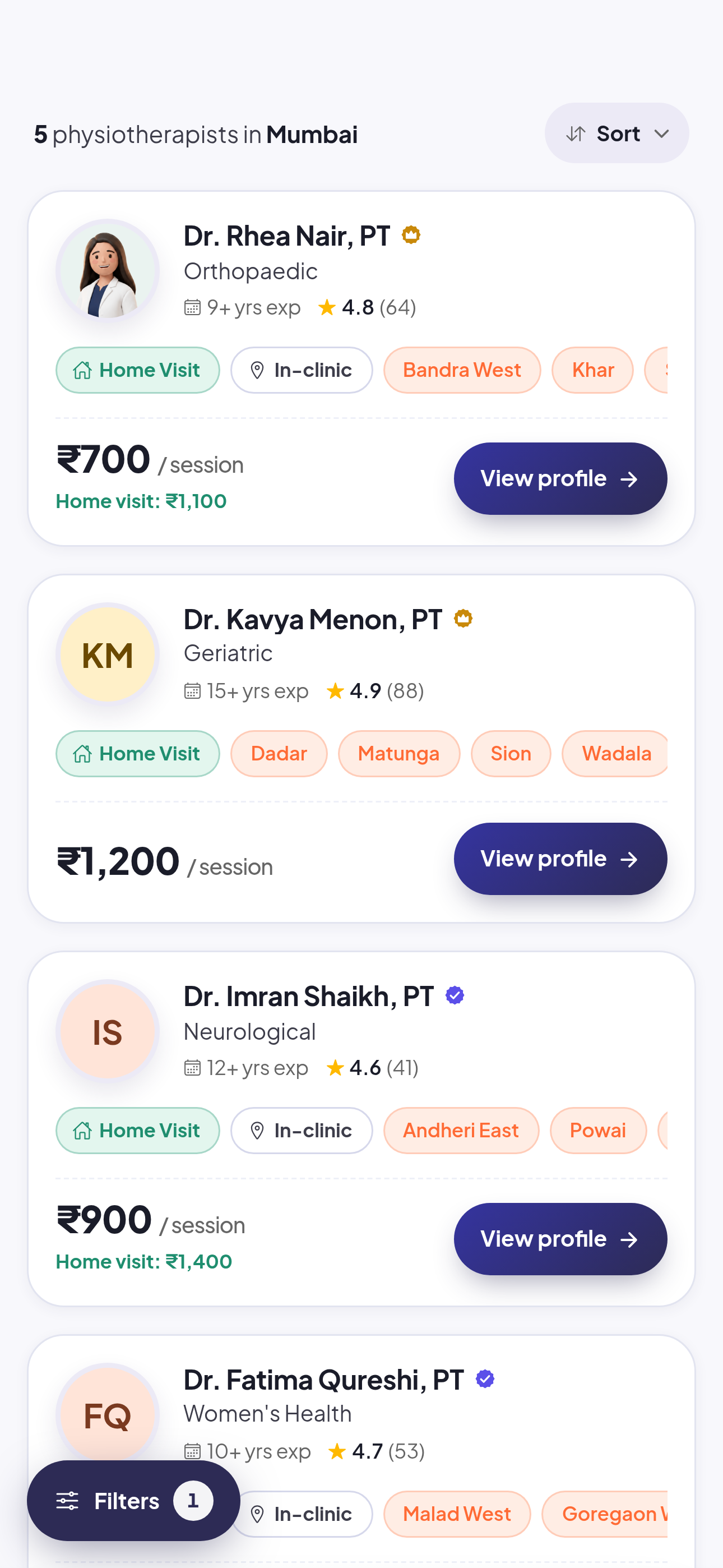
Example screen. The physiotherapists, ratings, prices and counts shown are made up for this guide. Step 3: Pick a date and time
The calendar on a profile shows only the slots that physiotherapist has actually opened. Choose one that suits you.
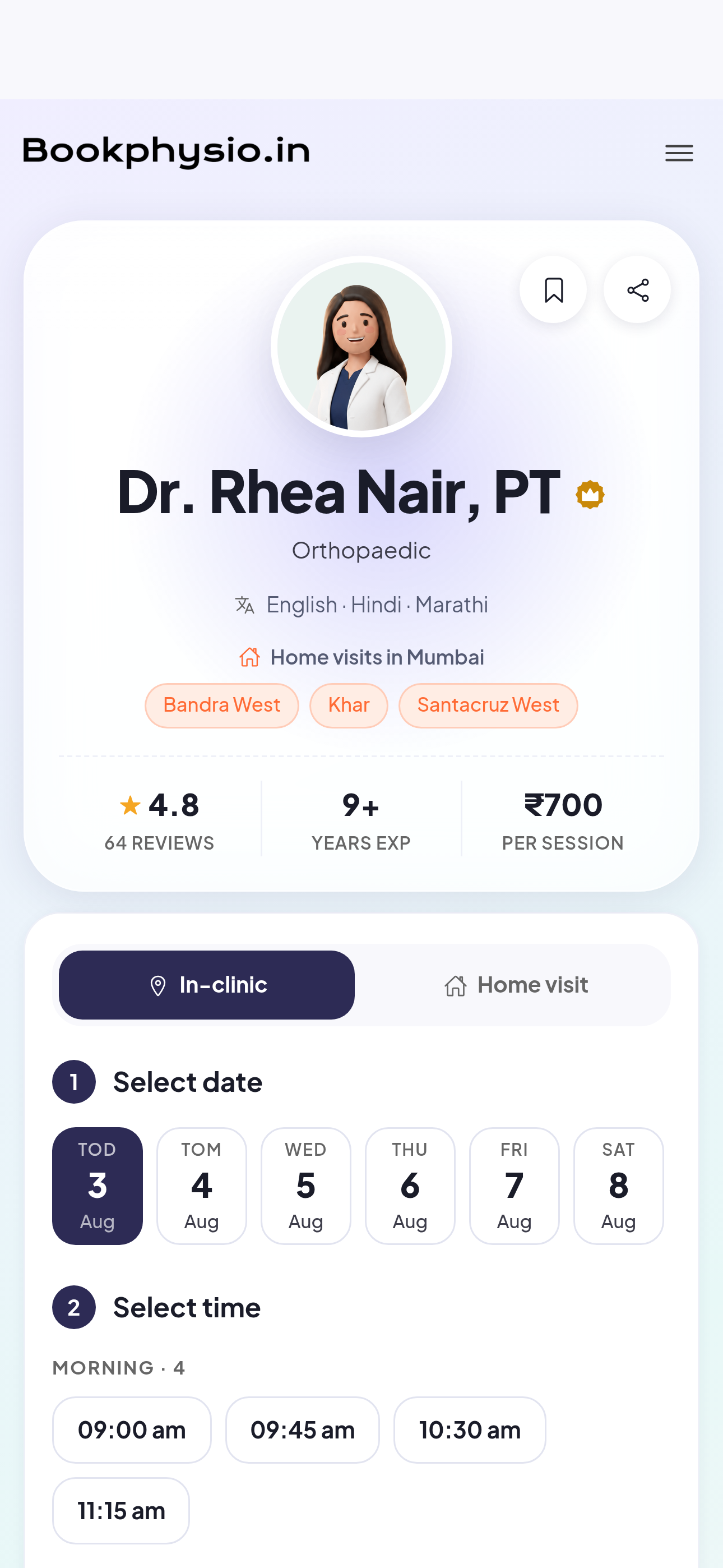
Example screen. The physiotherapists, ratings, prices and counts shown are made up for this guide. Step 4: Send your booking request
Confirm your details and send. Your booking stays a request at this point, and it appears under Visits straight away.
Step 5: Wait for the physiotherapist to accept
When they accept, your booking becomes confirmed and you get an email with the clinic address and contact details. If they cannot take it, you are told by email too.
Signed in already? Open this in the app and I will walk you through it.
- Do I pay when I book?
- No. You pay your physiotherapist directly at the session, by cash, UPI or card. BookPhysio.in does not collect payment online and takes no commission.
- Is my booking confirmed as soon as I send it?
- Not immediately. It is a request until the physiotherapist accepts it. You receive an email either way.
- Do I need a doctor’s referral?
- No. You can book a physiotherapist directly.
See also: How to reschedule or cancel a booking on BookPhysio.in, How to book a physiotherapy home visit on BookPhysio.in
How to reschedule or cancel a booking on BookPhysio.in
Change the time of a physiotherapy appointment, or cancel it, from the Visits screen in your account.
How to reschedule or cancel a booking on BookPhysio.in
Change the time of a physiotherapy appointment, or cancel it, from the Visits screen in your account.
Open Visits, choose the booking, and use the reschedule or cancel option on it. Your physiotherapist is told in the app. Reschedule as early as you can, because the new time still has to be a slot they have opened.
Step 1: Open your visits
Tap Visits in the bottom bar. Every booking you have sent is listed there, newest first.
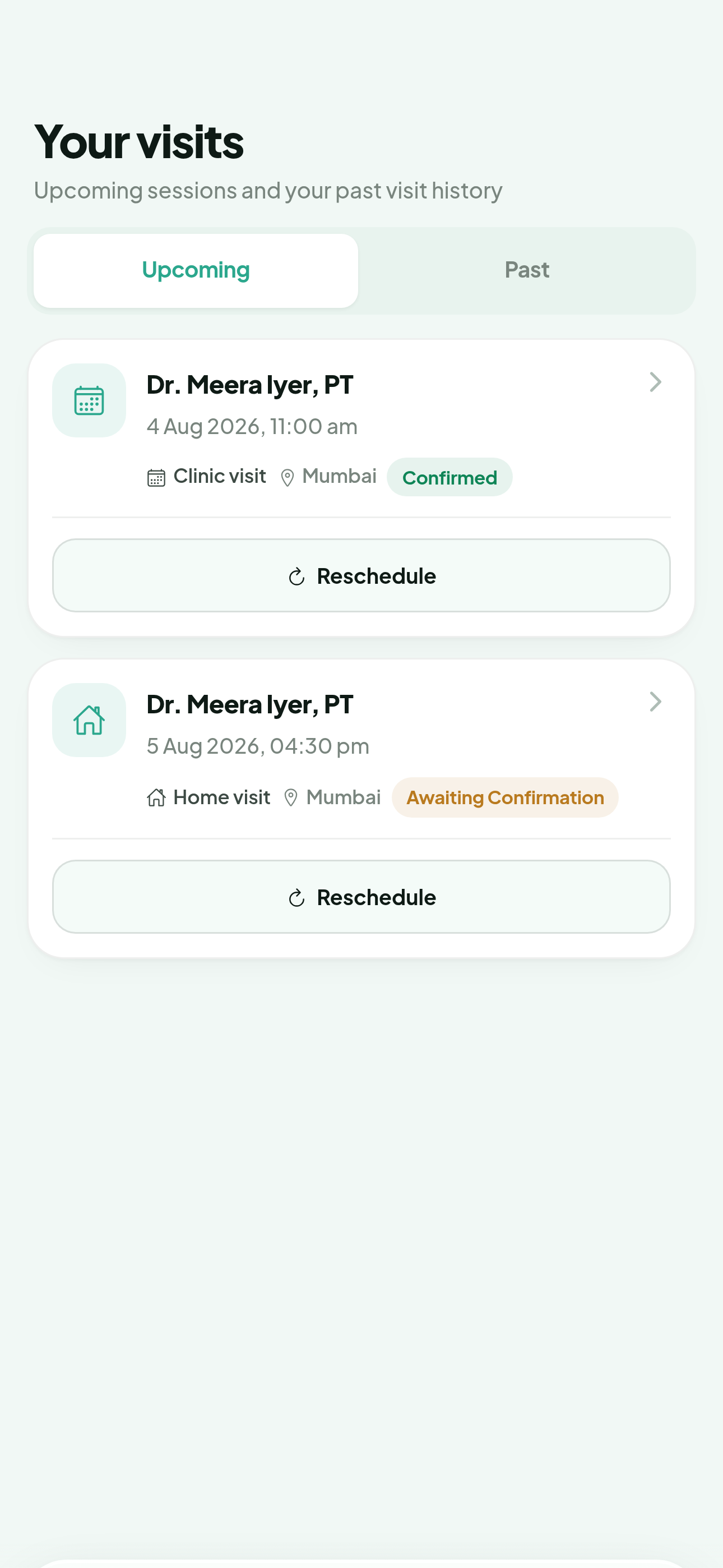
Example screen. The physiotherapists, ratings, prices and counts shown are made up for this guide. Step 2: Open the booking you want to change
Tap the booking to see its full detail, including the physiotherapist, the time and the current status.
Step 3: Choose reschedule or cancel
Reschedule shows that physiotherapist’s open slots so you can pick a new one. Cancel releases the slot.
Step 4: Confirm the change
Your physiotherapist is notified in the app, and the booking on your Visits screen updates to the new time or to cancelled. If you cancelled, we also email you a confirmation.
Signed in already? Open this in the app and I will walk you through it.
- How late can I cancel?
- Cancel as early as you can so the slot can go to someone else. Any specific notice period is set by the physiotherapist, and their profile is the place to check it.
- Will I be charged for cancelling?
- BookPhysio.in does not charge you anything, because payment happens directly between you and your physiotherapist at the session.
See also: How to book a physiotherapy appointment on BookPhysio.in
How to book a physiotherapy home visit on BookPhysio.in
Find a physiotherapist who covers your area and book a session at home instead of at a clinic.
How to book a physiotherapy home visit on BookPhysio.in
Find a physiotherapist who covers your area and book a session at home instead of at a clinic.
Filter your search to home visits, check that the physiotherapist covers your area, and book as normal. Home visits help if travelling to a clinic is difficult for you.
Step 1: Filter for home visits
On the search screen, set the visit type to home visit. Only physiotherapists who offer home visits are then shown.
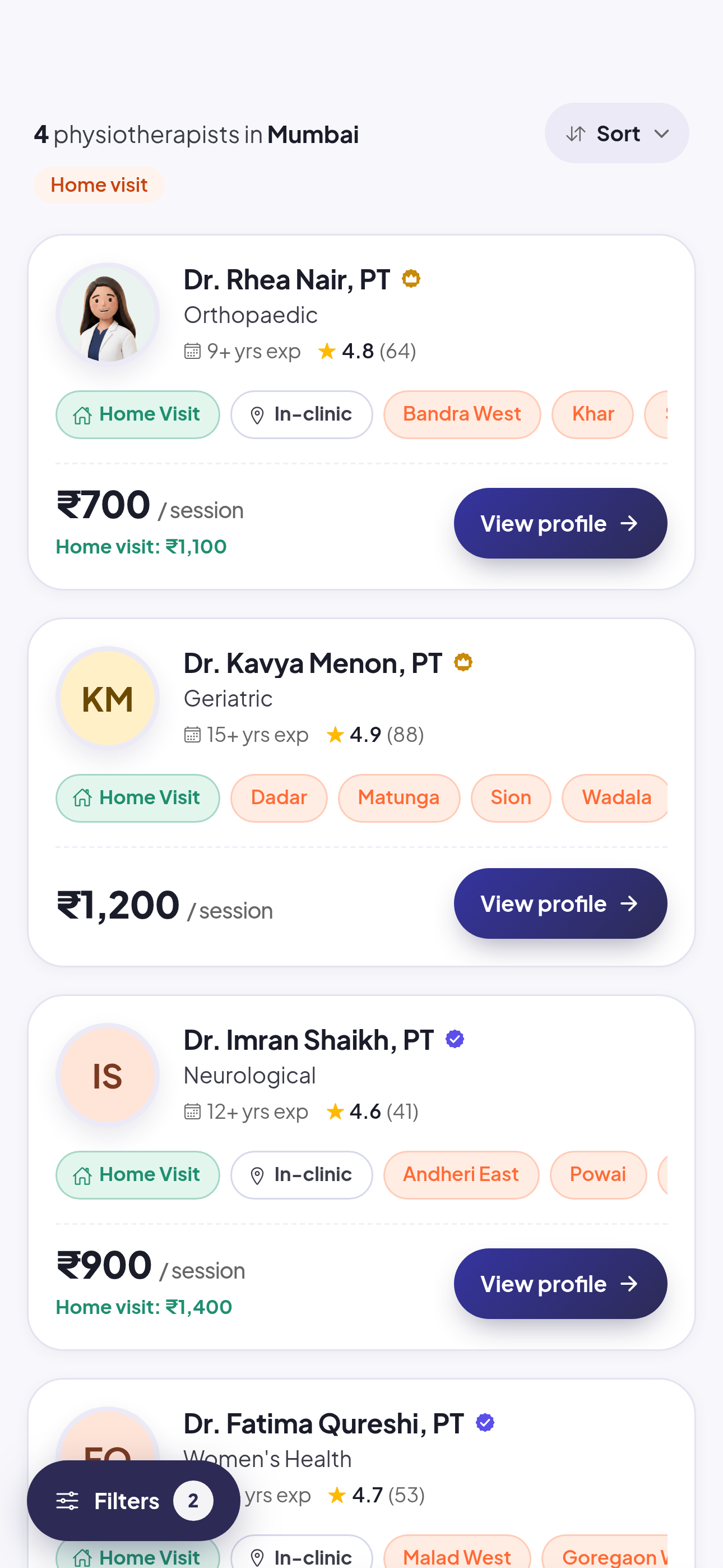
Example screen. The physiotherapists, ratings, prices and counts shown are made up for this guide. Step 2: Check they cover your area
A physiotherapist who offers home visits lists the areas they travel to. Confirm yours is among them before booking.
Step 3: Pick a slot and send the request
Choose a time from their calendar and send your booking request, exactly as you would for a clinic visit.
Step 4: Share your address
Add your full address and pincode to your profile so the physiotherapist can reach you. Add your phone number too, so they can call ahead on the day.
- Does a home visit cost more?
- Each physiotherapist sets their own fee, and a home visit fee is shown on their profile before you book. You pay them directly at the session.
- What if nobody covers my area?
- Try a clinic visit nearby, or widen the area in your search.
See also: How to book a physiotherapy appointment on BookPhysio.in
How to update your profile details on BookPhysio.in
Change your name, phone number and preferences so your physiotherapist can reach you.
How to update your profile details on BookPhysio.in
Change your name, phone number and preferences so your physiotherapist can reach you.
Open Account, tap Profile, edit your details and tap Save changes. Your phone number matters most: it is how your physiotherapist calls ahead about a home visit.
Step 1: Open your account
Tap Account in the bottom bar. It is the hub for your profile, payments and privacy.
Step 2: Tap Profile
Profile is the first row under Your account.
Step 3: Edit your details
Update your name, your +91 phone number, and your address and pincode if you want home visits.
Step 4: Tap Save changes
The Save changes button applies everything at once. Nothing is saved until you tap it.
Signed in already? Open this in the app and I will walk you through it.
- Why does BookPhysio.in need my phone number?
- So your physiotherapist can reach you about your booking, particularly for a home visit. BookPhysio.in itself communicates by email and does not send SMS or WhatsApp messages.
- Can I change the email address I sign in with?
- Your email is your sign-in, so it is not editable from this screen. Contact support if it needs to change.
See also: How to book a physiotherapy home visit on BookPhysio.in, How to find your physiotherapy session records on BookPhysio.in
How to find your physiotherapy session records on BookPhysio.in
See the notes and documents your physiotherapist has shared with you.
How to find your physiotherapy session records on BookPhysio.in
See the notes and documents your physiotherapist has shared with you.
Tap Records in the bottom bar. Anything your physiotherapist has shared with you appears there, newest first. Only you and your care team can open it.
Step 1: Open Records
Tap Records in the bottom bar of your home screen.
Step 2: Find the session
Records are listed by date, newest first. Tap one to read it in full.
Step 3: If a session is not there
A record appears only once your physiotherapist has written and shared it. If a recent session is missing, ask them at your next visit or message them from your account.
Signed in already? Open this in the app and I will walk you through it.
- Who else can see my records?
- You and your care team. They are not public and they are not shown on any profile.
- Can I download them?
- You can request a copy of your data from Manage my data, under Privacy & support in your account.
See also: How to message your physiotherapist on BookPhysio.in, How to update your profile details on BookPhysio.in
How to message your physiotherapist on BookPhysio.in
Send a message to your care team from inside the app.
How to message your physiotherapist on BookPhysio.in
Send a message to your care team from inside the app.
Open Account, tap Messages, and open the conversation with your physiotherapist. Messaging is for questions about your care, not for emergencies.
Step 1: Open your account
Tap Account in the bottom bar.
Step 2: Tap Messages
Messages sits under Activity, with your saved physios and notifications.
Step 3: Open the conversation
Tap your physiotherapist to open the thread, then write your message.
Signed in already? Open this in the app and I will walk you through it.
- Should I use this in an emergency?
- No. Your physiotherapist may not see a message straight away. For an emergency, call 112 or go to the nearest hospital. BookPhysio.in is not an emergency service.
- Will I be notified of a reply?
- Yes. A reply shows up under Notifications, and on your phone too if you have turned notifications on.
See also: How to find your physiotherapy session records on BookPhysio.in, How to turn on booking notifications on BookPhysio.in
How to save a physiotherapist for later on BookPhysio.in
Bookmark a physiotherapist so you can find them again without searching.
How to save a physiotherapist for later on BookPhysio.in
Bookmark a physiotherapist so you can find them again without searching.
Bookmark a physiotherapist from their profile, then find them again under Saved physios in your account. Saving does not book anything and does not notify them.
Step 1: Open a physiotherapist’s profile
Search for a physiotherapist and open their profile.
Step 2: Bookmark them
Use the bookmark control on their profile to save them to your list.
Step 3: Find them again
Tap Account, then Saved physios under Activity. Your bookmarked physiotherapists are listed there.
Signed in already? Open this in the app and I will walk you through it.
- Does saving a physiotherapist book anything?
- No. It is a bookmark for you. Nothing is sent to them and no appointment is held.
- Does the physiotherapist know I saved them?
- No. Saving is private to your account and nothing is sent to the physiotherapist. They only see your details once you send a booking request.
See also: How to book a physiotherapy appointment on BookPhysio.in
How to install the BookPhysio.in app on your phone
Add BookPhysio.in to your home screen on Android or iPhone. No app store needed.
How to install the BookPhysio.in app on your phone
Add BookPhysio.in to your home screen on Android or iPhone. No app store needed.
BookPhysio.in installs straight from your browser, so there is nothing to download from an app store. Once installed it opens full screen from your home screen, and notifications become available.
Step 1: Sign in on your phone
Open bookphysio.in in your phone’s browser and sign in. On iPhone, use Safari.
Step 2: Open the browser menu
On Android Chrome, tap the three-dot menu. On iPhone Safari, tap the Share button at the bottom of the screen.
Step 3: Choose Add to Home screen
Scroll to Add to Home screen, or Install app on Android, and tap it.
Step 4: Confirm
Tap Add or Install. The BookPhysio.in icon appears on your home screen and opens like any other app.
- Is there a Play Store or App Store app?
- You install BookPhysio.in from your browser rather than from a store. It works the same way once it is on your home screen.
- Why should I install it?
- It opens full screen, and on iPhone it is the only way notifications can work at all.
See also: How to turn on booking notifications on BookPhysio.in
How to turn on booking notifications on BookPhysio.in
Get notified when your physiotherapist accepts a booking or a session is coming up.
How to turn on booking notifications on BookPhysio.in
Get notified when your physiotherapist accepts a booking or a session is coming up.
Notifications are asked for once you are signed in. On an iPhone they work only after you install the app to your home screen, which is an Apple restriction rather than a setting we control. On Android and on a computer they work in the browser too.
Step 1: Install the app first if you are on an iPhone
On iPhone and iPad, notifications only work once BookPhysio.in is installed to the home screen. Install it, then open it from the home screen icon.
Step 2: Open your dashboard
Sign in and stay on your home screen for a moment. A card appears asking whether to turn notifications on.
Step 3: Tap Allow notifications
Your browser then asks for permission. Choose Allow.
Step 4: Check what has come in
Open Notifications from your account to see booking updates and replies in one list.
- I blocked notifications by mistake. Can I undo it?
- Yes, but not from inside the app, because a browser will not ask twice. Open this site’s settings in your browser, usually via the lock icon in the address bar, and allow notifications there.
- How will I hear about my booking?
- By email, and by notifications in the app once you turn them on. BookPhysio.in does not send SMS or WhatsApp messages. Your phone number is stored so your physiotherapist can reach you about a booking.
See also: How to install the BookPhysio.in app on your phone
Are you a physiotherapist? Read the guides for physiotherapists. For how the platform works overall rather than a specific task, read how BookPhysio.in works.